Showing posts with label software. Show all posts

Sunday, March 3, 2013

Lies, damned lies, and statistics

From my experience most PhDs in engineering and computer science must use quantitative data analyses and statistical techniques to evaluate and validate data within experiments at some point in their research. Increasingly social science researchers also use these techniques, mainly through well established software packages, such as SPSS, R-Statistics or other.

I have to say that most papers I read, even if they are relatively theoretical, do have a strong empirical data analysis component. One can sometime loose sight of the problems associated with statistical evaluations of empirical work, and hence I thought it be a good reminder for my readers and myself to refresh some common pitfalls with statistical techniques.


  • Discarding unfavorable data

  • Loaded questions

  • Overgeneralization

  • Biased samples

  • Misreporting or misunderstanding of estimated error

  • False causality

  • Proof of the null hypothesis

  • Data dredging

  • Data manipulation

Wikipedia is a good source. I also think a good statistics text will help in combination with some lighter reading.

There are also calls for researchers to make their code and datasets publicly available so that experiments can be repeated independently. This is now increasingly becoming a common practice, especially with high profile journals and conferences, but there are still numerous issues associated with making datasets and code-bases publicly available.

Saturday, March 2, 2013

The server side... and ASP.net side...

Browsing through my draft posts I found this draft, which I wrote while I was still a PhD student... just some ramblings about web programming and my past experiences with it.

Stay in Touch

To my surprise I made a rather interesting observation as a PhD student. A number of my PhD colleagues actually do not have any web-based programming knowledge or experience. This might come as a surprise but it may be their university simply stressed more fundamental CS issues and there was little time left for web programming or maybe they simply never had a chance to gain significant on-course / industry practice in web programming, and once their PhD started, their PhD topic was concerned with an entirely different topic. Whatever the reason, there's not any justifiable excuse in these days to ignore server side languages, especially as a comp. science student. During my PhD I therefore challenged myself to stay on top of new technology in server side programming. And yes maybe I lost some time that I could have dedicated elsewhere, at least I am ready to build a web based system at any time in pretty much any server language you'd throw at me!

Arguments for & against...

Within web-programming, we have a choice of languages to work with: Perl or C++ within a CGI setting, or PHP, ASP.Net (C#), JSP (Java), to name a few. i dabbed around in all of them at some point, but the most significant 'competition definitely takes place between PHP & ASP.net

The choice of language more often than anything depends on the background of the programmer. Then come into play execution speed, client preferences (sometime these are more important than any other factors, but more about that maybe in another post), and quite important is the question of available support and the availability of code base from past projects or from 3rd party sources, whether these be open-source or commercial. But the main idea is that we don't begin development from ground level.

PHP has it all, clients like it because it sprang from the open source movement and much more codebase out there is open source than probably for any other server side language out there. So this covers the client preference & availability of code-base factors. The speed is generally acceptable and programmers generally love PHP and since it is an interpreted language it's very easy to maintain and the symbiosis between PHP & MySQL works extremely well.

When I first dabbed in asp.net, this was in 2003/04, on 1.1 and 2.0 of the .net framework. Compared to PHP I hated many things about it, but that's a longer story! Since those days Microsoft engineers were bussy developing the technology, and currently we are at framework 4.0. I heard a lot of hype, as tends to be with Microsoft releases, so I decided to tame my curiosity.
  • ASP.net web-forms
  • ASP.net MVC
  • Stripped down (web-form free) approach
The idea for the stripped down approach was always within my head but in order to take this approach you really had to feel comfortable with some complexities of the chunky asp.net web-forms approach, until I found Chris Taylor's article.
ASP.net is much more complex as PHP, and maybe this is the problem with asp.net too. Due to it's complexity and the learning curve porgammers, quite rightly, keep away from it. Just to name a few problems. The asp.net menu control would render very ugly (non standard comliant) XHTML mark-up, instead of a CSS styled list which would be the way to go here, or asp.net would generate client IDs that depended on where in the page the server control occured rather than keeping the server ID assigned to the control in the first place. Fortunately at least the above named issues are resolved with framewrok 4.0, which gives us 'hope' for Microsoft.

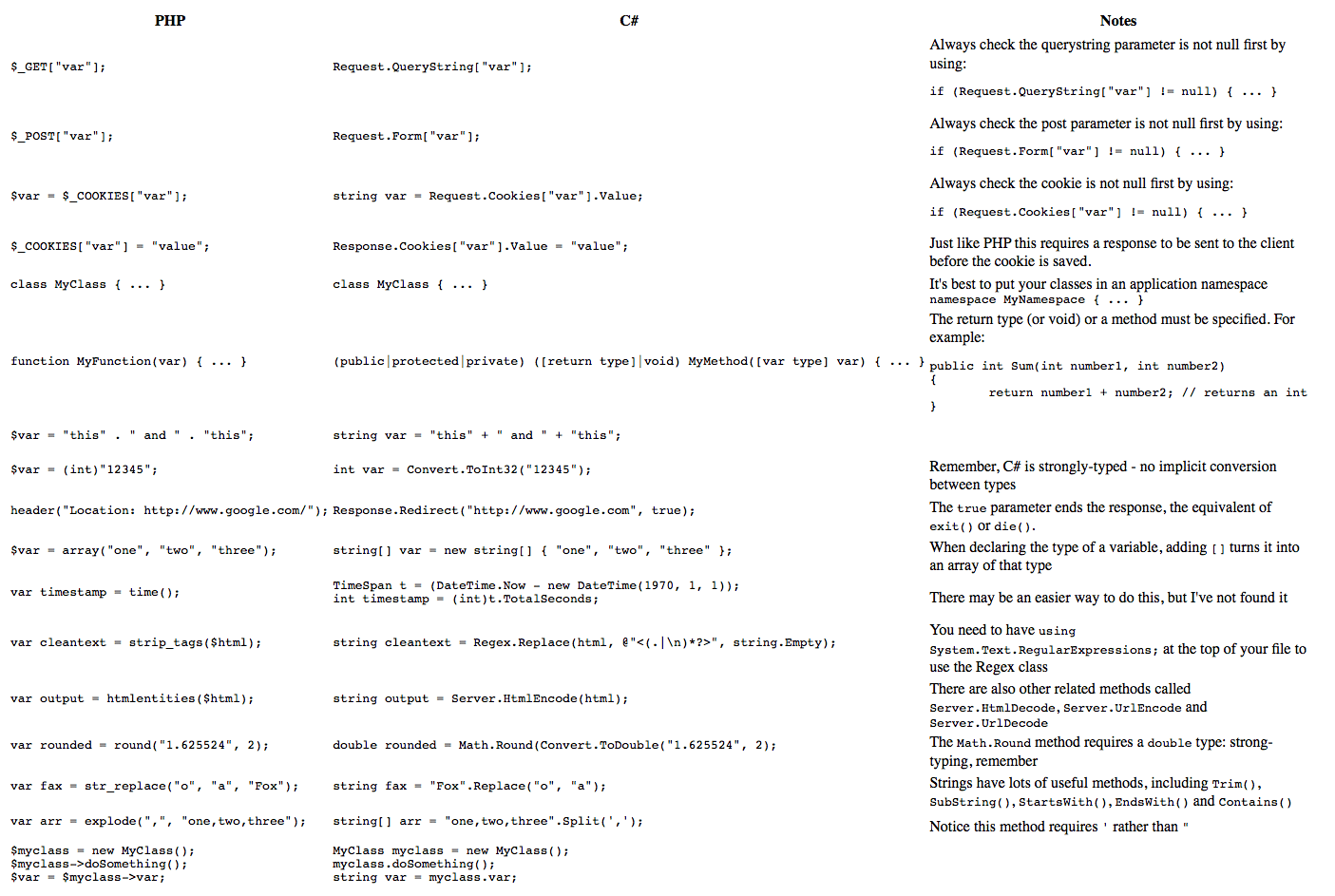
Comparison Table (useful for 1st time asp.net people)

Speed Comparison of server-side languages - check out the source site


Sunday, April 3, 2011

Removing a Fake-antivirus / Spyware

So this Saturday I noticed that my Eee PC Acer Netbook-laptop (running windows-XP) got infected by one of those nasty Fake-Antiviruses. Having worked for over a year @ the Loughborough UNI PC-Clinic, I knew straight away what to do, but this one was a nasty one and it did take me over 6 hours to clean and repair my system. Having a complicated programming environment set-up on my laptop I really didn't feel like re-installing everything, and I decided to identify and eliminate the virus carefully. I briefly share my experience here since it could help some other poor soul with the same problem.
  1. ...as soon as you notice the annoying pop-ups and fake/suspiciously-looking security centre warnings, restart your system and boot it up into "Safe-Mode with Networking". On most laptops you need to press/hold F8 to get the screen from which to choose Safe-Mode...
  2. ...the problem usually is, that the spyware will de-associate .exe files and you wont be able to start any programs, such as command line, reg-edit or even a browser (browsers start-up page and proxy-settings are also changed, so be careful to fix your browser settings). If you are lucky safe-mode will prevent the spyware running, but in my case safe-mode didnt help. But there's a surprisingly simple trick: If you have numerous accounts on your XP system and you usually use only one of them select the one that you use rarely or never (quite often this is the administrator account), and if you are lucky it turns out that the anti-virus will not have infected that user-account!
  3. ...I was lucky that my Admin-user account wasn't infected and from there I was able to manually look for the process in windows task manager and search my system for such files and delete them manually [be careful not to delete system files - also most likely you will have to enable the viewing of system files under win-xp].
  4. ...in safe-mode I was also able to run the following tools: Malwarebytes, SpyBot Search & Destroy and SUPERAntySpyware. The reason for running "Safe-Mode with Networking" is you can connect to the internet to update to the latest anti-spyware/virus definition files. If a connection to internet cannot be established make sure to install the latest versions and for SpyBot Search & Destroy you can install the latest definition files separately, which is very handy. Run all the tools in sequence (rebooting - back into safe-mode [this is important!!]) Each software found different elements of the spyware and were able to remove most of it. This will take a lot of time, each scan can take much more than an hour (I tend to set the process priority for the scan to "Real Time" as the OS scheduler this way allocates more CPU time to the process & the scan will run quicker). 
  5. ...once I was relatively sure the system was clean, I run the fullest possible scan with SUPERAntySpyware again, this detected a few more issues and only when I was pretty sure the system could be clean I then booted up normal win-xp.
You might be done now! - but in my case my exe file associations were still broken (the fake-anti-virus devastation it left behind). In order to fix-this you can manually edit the registry, download registry entries to merge with your registry or simply run a tool for XP which is what I've done this time and worked like a treat.

I recommend you also do your own research, I found many useful articles online, such as this one, and depending on the version of spyware/anti-virus you might need to take a slightly different approach. Good luck! 

Thursday, January 27, 2011

Fuzzy Logic (Building a Fuzzy Inference System)

Boolean Logic has been around for many years now, however "Fuzzy Logic" is a somewhat more recent "beast", Prof. Lofti Zadeh proposed fuzzy set theory back in 1965.

In this post I want to show online resources that will illustrate that Fuzzy Systems can be simple and most of all are very elegant way to solve some problems.

I had fuzzy set theory in one of my data-mining modules during my university time, studying comp science. It was straight forward but then I never had to make much use of it (only a tiny bit in my PhD). So anyway, let's just jump into it!

  1. A great way to start is to work through a real illustrative example, in which a Non-Fuzzy solution is explained, and then the Fuzzy solution is introduced and is shown that it actually does work better... <<This page does exactly that>>
  2. Get this by looking at many more examples... <<Here>>
  3. Try to build a Fuzzy Inference System yourself - based on the idea of "learning by doing"... <<this can be done here>> (note: this is Matlab based, but this doesn't matter at all)
  4. Research papers making use of Fuzzy sets might be usefull cheap option to learn more (<<for example>>), check out a book (or two) and play with a relevant code library.
Software Libraries

Python: pyFuzzy, peach || Java: RockOn Fuzzy, Funzy || C#.net: DotFuzzy

Great Books

Saturday, June 19, 2010

Prediction API & Big Data API

Google has branched out in many directions since their initial search-engine & adwords success. The company has had such healthy profits (mainly from their internet based advertising) that they were able to dab in pretty much every current interesting application in Computer Science - see here!

For a while they are providing cloud computing services, such as Google Storage for Developers, check out the pricing of that service here. Google maintains all the data within their own infrastructure. I think this article tries to explains how the distributed storage is implemented (of course just a very generic overview). You will notice that the service is naturally scalable and pretty smart in a number of ways.

The most recent activity of google resulted in the announcement of two new APIs (Prediction API and BigData API). The diagram below shows how these fit together.


BigData is used to query a large cloud store (using an SQL dialect over a webservice) and the Prediction API can be used on the data to train google implemented AI models for prediction. This simply seems to be a machine learning library that can be accessed over a webservice. Obviously this runs on google cloud infrastructure and that has it's advantages.

A number of Machine Learning libraries exist, such as WEKA, RapidMiner and many other. I used to write some of my own code for these algorithms, however over the last few years I noticed an amazing increase in the count of ML libraries. In most of my work these days I use open source libraries.

I am not quite sure how the pricing of these APIs works (maybe somebody can enlighten us on this issue), my impression is it is connected to the Google cloud store service, for which these APIs will present another reason to use this store.

You can check out some code samples for the API here.

Thursday, June 17, 2010

Open Source Licenses

The best place to visit for more information on licenses would be the Open Source Initiative (OSI) at www.opensource.org/docs/definition.php The last time I checked, OSI has certified about 50 different licenses as being conformant with its concept of open source. So there's plenty of choice, but I will mention 3 most popular ones to you here. In any case it probably makes sense to research these a little more on your own since you have the best idea of how strict a licence you are after.

1- GNU General Public License (GPL)
The most known os license, (find the authoritative version at www.gnu.org/copyleft/gpl.html)
It is probably one of the strongest (and notorious) os licenses, it has a section 2b in the license that makes GPL a viral license. That means that if anyone likes your code and uses that code, they have to make their entire software GPL licensed too. The GPL restricts the people that receive your code but not you. In fact you can change the licence for specific people or versions to a more commercial license at any time. However people that already downloaded/agreed to your GPL licensed code version can distribute it under the GPL as long as they like.

2- BSD License, a Berkeley license (www.freebsd.org) used in first edition of Unix, you probably know that already :-). Not as strict to code users as GPL is, for example microsoft is known to have used parts of UNixes networking code in its commercial version of windows.

3-Mozzila Public License (MPL) (www.mozilla.org/MPL) more complex and more loaded with legalese than the GPL, yet it is largerly compatible with GPL. There's one major difference thought. The GPL forbids combining GPL code with proprietary code in a larger piece of work, whereas the MPL expressly allows this. My understanding is that MPL somewhat occupies the middle ground between GPL and BSD licenses.

Funny thing is actually, Microsoft doesn't like open source software :-), they critisize various aspects about os, and therefore they came-up with their own initiative which they called Shared-Source Licenses (see http://www.microsoft.com/resources/sharedsource/default.mspx for more info)

Finally, I'd love to hear various experiences with open source licensing you might have had. You can either comment or email me directly (note: your comment will first go for approval - apologies, but this is necessary due to spam).

Tuesday, September 9, 2008

Stock-market screensaver

This is a little application I wrote during first 3 days of my PhD at Loughborough. It is a screensaver style financial data screen - the type that appears on TV channels such as Bloomberg and CNBC. Still written on the old .net 1.1 platform, it has an easily extensible 3-tier design. Data is accessed via yahoo.finance.com, hence data might be delayed (stock-prices delayed by 15 minutes) and the accuracy of data cannot be guaranteed. However if you are looking for a fun & cool financial data screen than don't look any further ;-). The application has following features:
  • FTSE-100 charts display area
  • Major Currencies display area
  • Stockprice ticker (15 minutes delayed)
  • Currency ticker
  • News feed display area (via RSS)
  • Settings: ticker speed, scroll direction and visual appearance, RSS feed settings and appearance (settings can be accessed by clicking in top-left corner below the logo)
There is still much to be desired for this application as I only had very limited time to design it. If you have ideas on how to improve and make the data-screen better I will be very happy to hear from you, I hope that if I get a little time I will extend the application myself.

Finally please note that if you use this application you are doing so at your own risk. I have tested the application to a degree but as I had limited time designing it there might still be a number of bugs in code. Hence I would discourage direct use for making real investment decisions. Rather use it to keep you up to date and informed about UK markets / Currencies / News. I for example keep this little financial data-screen running on my 2nd computer on my work desk during the day and every so often I glance over to read news-items. I find it quite useful and I hope you will to :-)

note: The application will change your screen resolution. When it is closed it will return back to the original resolution, however during the process desktop icons might be moved around undesirably. Please do read readme.txt file for more information.